| Foundation | Standard Edition | Enterprise Edition | |
| Developer features | |||
| Access Services | No | No | Yes |
| App Catalog (SharePoint) | No | Yes | Yes |
| App Deployment: Autohosted Apps | No | No | No |
| App Deployment: Cloud-Hosted Apps | No | Yes | Yes |
| App Deployment: SharePoint-Hosted Apps | No | Yes | Yes |
| App Management Services | No | Yes | Yes |
| BCS: Alerts for External Lists | No | Yes | Yes |
| BCS: App Scoped External Content Types (ECTs) | No | Yes | Yes |
| BCS: Business Data Webparts | No | Yes | Yes |
| BCS: External List | Yes | Yes | Yes |
| BCS: OData connector | No | Yes | Yes |
| BCS: Profile Pages | No | Yes | Yes |
| BCS: Rich Client Integration | No | No | Yes |
| BCS: Secure Store Service | Yes | Yes | Yes |
| BCS: Tenant-level external data log | No | No | Yes |
| Browser-based customizations | Yes | Yes | Yes |
| Client Object Model (OM) | Yes | Yes | Yes |
| Client-side rendering (CSR) | Yes | Yes | Yes |
| Custom Site Definitions | No | No | Yes |
| Custom Site Provisioning | No | No | Yes |
| Developer Site | No | No | No |
| Forms Based Applications | No | Yes | Yes |
| Forms on Spreadsheets | No | Yes | Yes |
| Full-Trust Solutions | Yes | Yes | Yes |
| InfoPath Forms Services | No | No | Yes |
| JavaScript Object Model | Yes | Yes | Yes |
| List and Library APIs | Yes | Yes | Yes |
| Remote Event Receiver | Yes | Yes | Yes |
| REST API | Yes | Yes | Yes |
| Sandboxed Solutions | Yes | Yes | Yes |
| SharePoint Design Manager | Yes | Yes | Yes |
| SharePoint Designer | Yes | Yes | Yes |
| SharePoint Store | Yes | Yes | Yes |
| Workflow 2010 (.NET 3.5) | Yes | Yes | Yes |
| Workflow 2010 (out of the box) | No | Yes | Yes |
| Workflow 2013 | No | Yes | Yes |
| Workload API: ECM APIs | No | Yes | Yes |
| Workload API: Search APIs | Yes | Yes | Yes |
| Workload API: Social APIs | No | Yes | Yes |
| IT Professional features | |||
| Active Directory Synchronization | Yes | Yes | Yes |
| Alternate Access Mapping (AAM) | Yes | Yes | Yes |
| Analytics Platform | No | No | Yes |
| Claims-Based Authentication Support | Yes | Yes | Yes |
| Configuration Wizards | No | Yes | Yes |
| Deferred Site Collection upgrade | Yes | Yes | Yes |
| Distributed Cache | Yes | Yes | Yes |
| Host Header Site Collections | Yes | Yes | Yes |
| Improved Permissions Management | Yes | Yes | Yes |
| Improved Self-Service Site Creation | No | No | Yes |
| Managed Accounts | Yes | Yes | Yes |
| Minimal Download Strategy (MDS) | Yes | Yes | Yes |
| OAuth | No | Yes | Yes |
| Patch Management | Yes | Yes | Yes |
| Quota Templates | Yes | Yes | Yes |
| Read-Only Database Support | Yes | Yes | Yes |
| Remote Blog Storage | Yes | Yes | Yes |
| Request Management | Yes | Yes | Yes |
| Request throttling | Yes | Yes | Yes |
| Resource throttling | Yes | Yes | Yes |
| Service Application Platform | Yes | Yes | Yes |
| SharePoint Health Analyzer | Yes | Yes | Yes |
| SharePoint Online Admin Center | N/A (SharePoint Online only) | N/A (SharePoint Online only) | N/A (SharePoint Online only) |
| Shredded Storage | Yes | Yes | Yes |
| Site Collection Compliance Policies | No | Yes | Yes |
| Site Collection Health Checks | Yes | Yes | Yes |
| State Service | Yes | Yes | Yes |
| Streamlined Central Administration | Yes | Yes | Yes |
| System Status Notifications | Yes | Yes | Yes |
| Unattached Content Database Recovery | Yes | Yes | Yes |
| Upgrade evaluation site collections | Yes | Yes | Yes |
| Usage Reporting and Logging | Yes | Yes | Yes |
| Windows PowerShell Support | Yes | Yes | Yes |
| Content features | |||
| Accessibility Standards Support | Yes | Yes | Yes |
| Asset Library Enhancements/Video Support | Yes | Yes | Yes |
| Auditing | No | Yes | Yes |
| Auditing & Reporting (e.g. doc edits, policy edits, deletes) | No | Yes | Yes |
| Auditing of View Events | No | Yes | Yes |
| Content Organizer | No | Yes | Yes |
| Design Manager | Yes | Yes | Yes |
| Document Sets | No | Yes | Yes |
| Document Translation in Word Web App | Yes | Yes | Yes |
| eDiscovery | No | No | Yes |
| External Sharing: External Access | No | No | No |
| External Sharing: Guest Link | No | No | No |
| Folder Sync | No | Yes | Yes |
| Information Rights Management (IRM) | No | Yes | Yes |
| In-Place Hold | Yes | Yes | Yes |
| Managed Metadata Service | No | Yes | Yes |
| Metadata-driven Navigation | No | Yes | Yes |
| Multi-stage Disposition | No | Yes | Yes |
| Office ProPlus (Osub) | No | No | No |
| Office Web Apps (edit) | Yes | Yes | Yes |
| Office Web Apps (view) | Yes | Yes | Yes |
| Office Web Apps Server integration | Yes | Yes | Yes |
| PowerPoint Automation Services | No | Yes | Yes |
| Preservation hold library | No | No | Yes |
| Quick Edit | Yes | Yes | Yes |
| Related Items | Yes | Yes | Yes |
| Rich Media Management | No | Yes | Yes |
| Shared Content Types | No | Yes | Yes |
| SharePoint Translation Services | No | Yes | Yes |
| Site mailbox | No | Yes | Yes |
| Unique Document IDs | No | Yes | Yes |
| Video Search | No | No | Yes |
| WCM: Analytics | No | Yes | Yes |
| WCM: Catalog | No | No | Yes |
| WCM: Cross-site publishing | No | No | Yes |
| WCM: Designer Tools | No | Yes | Yes |
| WCM: Faceted navigation | No | No | Yes |
| WCM: Image Renditions | No | No | Yes |
| WCM: Mobile and Device Rendering | No | Yes | Yes |
| WCM: Multiple Domains | No | No | Yes |
| WCM: OOTB Recommendations Webparts | No | Yes | Yes |
| WCM: Search Engine Optimizations (SEO) | No | Yes | Yes |
| WCM: Topic Pages | No | No | Yes |
| Word Automation Services | No | Yes | Yes |
| Insights features | |||
| Business Intelligence Center | No | No | Yes |
| Calculated Measures and Members | No | No | Yes |
| Data Connection Library | No | No | Yes |
| Decoupled PivotTables and PivotCharts | No | No | Yes |
| Excel Services | No | No | Yes |
| Field list and Field Support | No | No | Yes |
| Filter Enhancements | No | No | Yes |
| Filter Search | No | No | Yes |
| PerformancePoint Services | No | No | Yes |
| PerformancePoint Services (PPS) Dashboard Migration | No | No | Yes |
| Power View | No | No | Yes |
| PowerPivot | No | No | Yes |
| Quick Explore | No | No | Yes |
| Scorecards & Dashboards | No | No | Yes |
| SQL Server Reporting Services (SSRS) Integrated Mode | No | No | Yes |
| SQL Server Reporting Services (SSRS) Integrated Mode | No | No | Yes |
| Timeline Slicer | No | No | Yes |
| Visio Services | No | No | Yes |
| Search features | |||
| Advanced Content Processing | Yes | Yes | Yes |
| Content Search Web Part | No | No | Yes |
| Continuous crawl | Yes | Yes | Yes |
| Custom entity extraction | No | No | Yes |
| Deep links | No | Yes | Yes |
| Event-based relevancy | No | Yes | Yes |
| Expertise Search | Yes | Yes | Yes |
| Extensible content processing | No | No | Yes |
| Graphical refiners | No | Yes | Yes |
| Hybrid search | Yes | Yes | Yes |
| Managed navigation | No | Yes | Yes |
| On-premises search index | N/A (SharePoint Online only) | N/A (SharePoint Online only) | N/A (SharePoint Online only) |
| Phonetic name matching | Yes | Yes | Yes |
| Query rules—Add promoted results | No | Yes | Yes |
| Query rules—advanced actions | No | No | Yes |
| Query spelling correction | Yes | Yes | Yes |
| Query suggestions | No | Yes | Yes |
| Query throttling | No | Yes | Yes |
| Quick preview | Yes | Yes | Yes |
| Recommendations | No | Yes | Yes |
| Refiners | Yes | Yes | Yes |
| RESTful Query API/Query OM | Yes | Yes | Yes |
| Result sources | Yes | Yes | Yes |
| Search connector framework | No | No | No |
| Search results sorting | Yes | Yes | Yes |
| Search vertical: “Conversations” | No | Yes | Yes |
| Search vertical: “People” | No | Yes | Yes |
| Search vertical: “Video” | No | No | Yes |
| Tunable Relevancy | No | No | No |
| Sites features | |||
| Change the look | Yes | Yes | Yes |
| Connections to Microsoft Office Clients | Yes | Yes | Yes |
| Cross Browser Support | Yes | Yes | Yes |
| Custom Managed Paths | Yes | Yes | Yes |
| Governance | Yes | Yes | Yes |
| Large List Scalability and Management | Yes | Yes | Yes |
| Mobile Connectivity | Yes | Yes | Yes |
| Multi-Lingual User Interface | Yes | Yes | Yes |
| My Tasks | Yes | Yes | Yes |
| OOTB Web Parts | Yes | Yes | Yes |
| Permissions Management | Yes | Yes | Yes |
| Project functionality for team sites | Yes | Yes | Yes |
| Project site template | Yes | Yes | Yes |
| Project Summary web part | Yes | Yes | Yes |
| Project workspace | Yes | Yes | Yes |
| Public Website (SPO) | N/A (SharePoint Online only) | N/A (SharePoint Online only) | N/A (SharePoint Online only) |
| SharePoint Lists | Yes | Yes | Yes |
| SharePoint Ribbon | Yes | Yes | Yes |
| Task list | Yes | Yes | Yes |
| Team Site: Drag & Drop | Yes | Yes | Yes |
| Team Site: Notebook | Yes | Yes | Yes |
| Team Site: Simplified Access | Yes | Yes | Yes |
| Templates | Yes | Yes | Yes |
| Themes | Yes | Yes | Yes |
| Work Management Service | Yes | Yes | Yes |
| Usage Analytics | Yes | Yes | Yes |
| Social features | |||
| Ask Me About | No | Yes | Yes |
| Blogs | Yes | Yes | Yes |
| Communities Reputation, Badging, and Moderation | No | Yes | Yes |
| Community | Yes | Yes | Yes |
| Company Feed | Yes | Yes | Yes |
| Follow | No | Yes | Yes |
| Microblogging | No | Yes | Yes |
| Newsfeed | No | Yes | Yes |
| One Click Sharing | No | Yes | Yes |
| People, Sites, Document Recommendations | No | Yes | Yes |
| Personal Site | No | Yes | Yes |
| Photos and Presence | Yes | Yes | Yes |
| Profile | No | Yes | Yes |
| Ratings | No | Yes | Yes |
| Site Feed | Yes | Yes | Yes |
| Skydrive Pro | Yes | Yes | Yes |
| Tag profiles | No | Yes | Yes |
| Tasks integrated with Outlook | No | Yes | No |
| Trending Tags | No | Yes | Yes |
| Wikis | Yes | Yes | Yes |
Saturday, May 11, 2013
Comparison cheatsheet for SharePoint 2013 Foundation vs. SharePoint 2013 Standard vs. SharePoint 2013 Enterprise
Find below a table that outlines the various features included in the different versions of SharePoint 2013 (Foundation vs. Standard vs. Enterprise)


Wednesday, May 01, 2013
Server Error: 3204 Server: 'https://mail.services.live.com/DeltaSync_v2.0.0/Sync.aspx' Windows Live Mail Error ID: 0x8DE20003
Windows live mail has stopped working. Today it stopped sending messages, in the end I deleted the account and re added it and now it won't sync with my Hotmail account at all - it just doesn't pull anything down.'
On further research (especially when clicking Send/Receive) I get the following error message:
Server Error: 3204 Server: 'https://mail.services.live.com/DeltaSync_v2.0.0/Sync.aspx'
Windows Live Mail Error ID: 0x8DE20003
RESOLUTION STEPS (Perform the steps below at your OWN RISK as you are modifying your computer's registry)
1) Deleted registry key: HKEY_CURRENT_USER\Software\Microsoft\Windows Live Mail
2) Deleted folder: C:\Users\USERNAME\AppData\Local\Microsoft\Windows Live Mail
3) Reinstall Windows Live Mail - http://windows.microsoft.com/en-us/windows-live/essentials-home
On further research (especially when clicking Send/Receive) I get the following error message:
Server Error: 3204 Server: 'https://mail.services.live.com/DeltaSync_v2.0.0/Sync.aspx'
Windows Live Mail Error ID: 0x8DE20003
RESOLUTION STEPS (Perform the steps below at your OWN RISK as you are modifying your computer's registry)
1) Deleted registry key: HKEY_CURRENT_USER\Software\Microsoft\Windows Live Mail
2) Deleted folder: C:\Users\USERNAME\AppData\Local\Microsoft\Windows Live Mail
3) Reinstall Windows Live Mail - http://windows.microsoft.com/en-us/windows-live/essentials-home
Friday, November 09, 2012
PDF Icon not showing in SharePoint 2010 Document Library
Follow the steps below to resolve the issue of PDF icon not showing up in Document Libraries in SharePoint 2010:
1) Download icon - http://www.adobe.com/images/pdficon_small.gif and copy to C:\Program Files\Common Files\Microsoft Shared\Web Server Extensions\14\TEMPLATE\IMAGES
2) Navigate to C:\Program Files\Common Files\Microsoft Shared\Web Server Extensions\14\TEMPLATE\XML - Open the file "DOCICON.XML" in notepad
3) Enter a Mapping key <Mapping Key="pdf" Value="pdficon_small.gif" /> right above the </ByExtension> tag. Save the file and exit
4) Perform iisreset /noforce
5) Do the above steps in each SharePoint server in your farm.
1) Download icon - http://www.adobe.com/images/pdficon_small.gif and copy to C:\Program Files\Common Files\Microsoft Shared\Web Server Extensions\14\TEMPLATE\IMAGES
2) Navigate to C:\Program Files\Common Files\Microsoft Shared\Web Server Extensions\14\TEMPLATE\XML - Open the file "DOCICON.XML" in notepad
3) Enter a Mapping key <Mapping Key="pdf" Value="pdficon_small.gif" /> right above the </ByExtension> tag. Save the file and exit
4) Perform iisreset /noforce
5) Do the above steps in each SharePoint server in your farm.
Sunday, November 04, 2012
Change your default Windows 8 Enterprise Product Key
Step 1 - Launch cmd.exe in Administrator mode (right click on cmd.exe and select "Run as Administrator")
Step 2 - In the command window type slui.exe 3
Step 3 - In the new Window that pops up, enter your new licensed Windows 8 Enterprise Product Key
If you purchased a downloaded a licensed version of Windows Enterprise using your MSDN licensing then this option will work and your Windows will be activated and ready for use
ENJOY the most powerful OS built by Microsoft ever!
Step 2 - In the command window type slui.exe 3
Step 3 - In the new Window that pops up, enter your new licensed Windows 8 Enterprise Product Key
If you purchased a downloaded a licensed version of Windows Enterprise using your MSDN licensing then this option will work and your Windows will be activated and ready for use
ENJOY the most powerful OS built by Microsoft ever!
Thursday, May 31, 2012
Unable to see the Drag and Drop Multiple File Upload control in SharePoint 2010
Ever came across this annoying and mysterious issue on how the SharePoint 2007/2010 Multiple file upload control shows either "Drag and Drop" screen or a flat "checkbox screen where you can only bulk upload from a single folder" - If answer is YES then read on to solve the issue for good in terms of how to always see the "Drag and Drop" screen for multiple file upload.
Ensure that you are unable to see the Drag and Drop feature when you click on "Upload Multiple Files" in SharePoint. If you dont then take the following steps to resolve:
1) If you are using IE Browser, Click on Tools > Manage Add-ons and validate this add-on version "STSUpld.UploadCtl" - it it says 12.0.... then its the older version as it should say 14.0... You have found your PROBLEM!
2) To Resolve Step 1 version issue, Open Add/Remove Programs and Click on Microsoft SharePoint Designer 2010 and select "Change" option. When wizard opens up then select "Repair" option and let the Microsoft Wizard do the trick for you. Let the Repair process finish.
3) Close all browsers down and now launch IE and goto your favourite SharePoint document library when you want to upload multiple files and VOILA! - You should see the Multiple File Upload control show the Drag and Drop Wizard
NOTE - If you note in Step 1 that you cannot find the Add-on OR in Step 2 where your client computer does not have Microsoft SharePoint Designer 2010, then I recommend you do the following:
1) Free download and install Microsoft SharePoint Designer 2010 (64-bit here / 32-bit here)
2) Free download and install Microsoft Silverlight
3) Free download and upgrade browser to IE 9.0 (recommended only not mandatory)
Ensure that you are unable to see the Drag and Drop feature when you click on "Upload Multiple Files" in SharePoint. If you dont then take the following steps to resolve:
1) If you are using IE Browser, Click on Tools > Manage Add-ons and validate this add-on version "STSUpld.UploadCtl" - it it says 12.0.... then its the older version as it should say 14.0... You have found your PROBLEM!
2) To Resolve Step 1 version issue, Open Add/Remove Programs and Click on Microsoft SharePoint Designer 2010 and select "Change" option. When wizard opens up then select "Repair" option and let the Microsoft Wizard do the trick for you. Let the Repair process finish.
3) Close all browsers down and now launch IE and goto your favourite SharePoint document library when you want to upload multiple files and VOILA! - You should see the Multiple File Upload control show the Drag and Drop Wizard
NOTE - If you note in Step 1 that you cannot find the Add-on OR in Step 2 where your client computer does not have Microsoft SharePoint Designer 2010, then I recommend you do the following:
1) Free download and install Microsoft SharePoint Designer 2010 (64-bit here / 32-bit here)
2) Free download and install Microsoft Silverlight
3) Free download and upgrade browser to IE 9.0 (recommended only not mandatory)
Sunday, March 18, 2012
How to Resolve BCS (SharePoint 2010) Error "Login failed for user 'NT AUTHORITY\ANONYMOUS LOGON"
Here are the steps to resolve BCS (SharePoint 2010) Error "Login failed for user 'NT AUTHORITY\ANONYMOUS LOGON":
1) Open Powershell (Run as Administrator) and type the following lines:
$bdc = Get-SPServiceApplication | where {$_ -match "Business Data Connectivity Services"}
$bdc.RevertToSelfAllowed = $true
$bdc.Update();
NOTE - That your BCS Service Application should match the name as above. Else change it to what your BCS Service application is called (the way you find out is by going to Central Admin > Application Management > Manage Service Applications (and look for BCS Service App name)
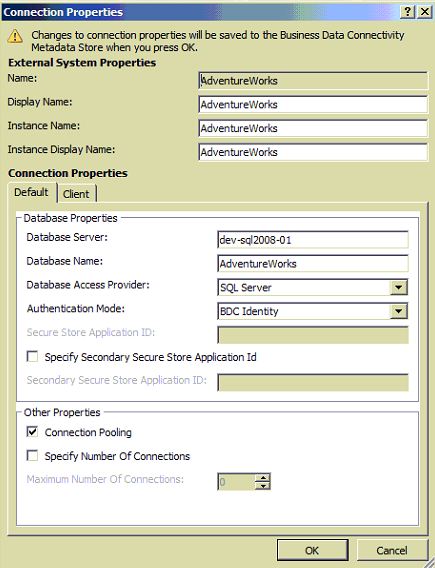
Once above is done, Open the External Content Type in SharePoint Designer 2010 and Click on Edit Connection Properties:

Once the Edit Connection Properties dialog opens, ensure that you have selected the "BDC Identity" value for the Authentication Mode property

Go Back to the ECT Read screen in your SharePoint site and hold your Ctrl key and click the refresh button on your browser. EUREKA! The error "Login failed for user 'NT AUTHORITY\ANONYMOUS LOGON" should now get resolved and you should see results displayed from yor LoB
1) Open Powershell (Run as Administrator) and type the following lines:
$bdc = Get-SPServiceApplication | where {$_ -match "Business Data Connectivity Services"}
$bdc.RevertToSelfAllowed = $true
$bdc.Update();
NOTE - That your BCS Service Application should match the name as above. Else change it to what your BCS Service application is called (the way you find out is by going to Central Admin > Application Management > Manage Service Applications (and look for BCS Service App name)
Once above is done, Open the External Content Type in SharePoint Designer 2010 and Click on Edit Connection Properties:

Once the Edit Connection Properties dialog opens, ensure that you have selected the "BDC Identity" value for the Authentication Mode property
Monday, January 30, 2012
Annoying DOTNETNUKE 5.x or 6.x version ISSUE - Subquery returned more than 1 value. This is not permitted when the subquery follows =, !=, <, <= , >, >= or when the subquery is used as an expression.
I was running a DNN app on my local machine. I have now moved it to my server and am trying to get it working.
Note that I am using Godaddy hosting
ERROR IS AS FOLLOWS:
Subquery returned more than 1 value. This is not permitted when the subquery follows =, !=, <, <= , >, >= or when the subquery is used as an expression.
Description: An unhandled exception occurred during the execution of the current web request. Please review the stack trace for more information about the error and where it originated in the code.
Exception Details: System.Data.SqlClient.SqlE
Source Error:
An unhandled exception was generated during the execution of the current web request. Information regarding the origin and location of the exception can be identified using the exception stack trace below.
Stack Trace:
[SqlException (0x80131904): Subquery returned more than 1 value. This is not permitted when the subquery follows =, !=, <, <= , >, >= or when the subquery is used as an expression.]
System.Data.SqlClient.SqlC
System.Data.SqlClient.SqlI
System.Data.SqlClient.TdsP
System.Data.SqlClient.TdsP
System.Data.SqlClient.SqlC
System.Data.SqlClient.SqlC
System.Data.SqlClient.SqlC
System.Data.SqlClient.SqlC
System.Data.SqlClient.SqlC
Microsoft.ApplicationBlock
Microsoft.ApplicationBlock
Microsoft.ApplicationBlock
DotNetNuke.Data.SqlDataPro
DotNetNuke.Entities.Host.S
DotNetNuke.Common.Initiali
DotNetNuke.Common.Initiali
DotNetNuke.HttpModules.Req
System.Web.SyncEventExecut
System.Web.HttpApplication
ISSUE FIX IS AS FOLLOWS:
Goto SQL Server, Find the Stored Procedure called "UpdateServerActivity" and alter it as follows (change highlighted in RED):
ALTER PROCEDURE dbo.UpdateServerActivity
@ServerName nvarchar(50),
@IISAppName nvarchar(200),
@CreatedDate datetime,
@LastActivityDate datetime
AS
DECLARE @ServerID int
-- SET @ServerID = (SELECT ServerID FROM dbo.WebServers WHERE ServerName = @ServerName AND IISAppName = @IISAppName)
SET @ServerID = (SELECT Top 1 ServerID FROM dbo.WebServers WHERE ServerName = @ServerName AND IISAppName = @IISAppName order by LastActivityDate DESC)
IF @ServerID IS NULL
BEGIN
-- Insert
INSERT INTO dbo.WebServers (
ServerName,
IISAppName,
CreatedDate,
LastActivityDate,
[Enabled]
)
VALUES (
@ServerName,
@IISAppName,
@CreatedDate,
@LastActivityDate,
0
)
END
ELSE
BEGIN
-- Update
UPDATE dbo.WebServers
SET
LastActivityDate = @LastActivityDate
WHERE ServerName = @ServerName AND IISAppName = @IISAppName
END
GO
Note that I am using Godaddy hosting
ERROR IS AS FOLLOWS:
Subquery returned more than 1 value. This is not permitted when the subquery follows =, !=, <, <= , >, >= or when the subquery is used as an expression.
Description: An unhandled exception occurred during the execution of the current web request. Please review the stack trace for more information about the error and where it originated in the code.
Exception Details: System.Data.SqlClient.SqlE
Source Error:
An unhandled exception was generated during the execution of the current web request. Information regarding the origin and location of the exception can be identified using the exception stack trace below.
Stack Trace:
[SqlException (0x80131904): Subquery returned more than 1 value. This is not permitted when the subquery follows =, !=, <, <= , >, >= or when the subquery is used as an expression.]
System.Data.SqlClient.SqlC
System.Data.SqlClient.SqlI
System.Data.SqlClient.TdsP
System.Data.SqlClient.TdsP
System.Data.SqlClient.SqlC
System.Data.SqlClient.SqlC
System.Data.SqlClient.SqlC
System.Data.SqlClient.SqlC
System.Data.SqlClient.SqlC
Microsoft.ApplicationBlock
Microsoft.ApplicationBlock
Microsoft.ApplicationBlock
DotNetNuke.Data.SqlDataPro
DotNetNuke.Entities.Host.S
DotNetNuke.Common.Initiali
DotNetNuke.Common.Initiali
DotNetNuke.HttpModules.Req
System.Web.SyncEventExecut
System.Web.HttpApplication
ISSUE FIX IS AS FOLLOWS:
Goto SQL Server, Find the Stored Procedure called "UpdateServerActivity" and alter it as follows (change highlighted in RED):
ALTER PROCEDURE dbo.UpdateServerActivity
@ServerName nvarchar(50),
@IISAppName nvarchar(200),
@CreatedDate datetime,
@LastActivityDate datetime
AS
DECLARE @ServerID int
-- SET @ServerID = (SELECT ServerID FROM dbo.WebServers WHERE ServerName = @ServerName AND IISAppName = @IISAppName)
SET @ServerID = (SELECT Top 1 ServerID FROM dbo.WebServers WHERE ServerName = @ServerName AND IISAppName = @IISAppName order by LastActivityDate DESC)
IF @ServerID IS NULL
BEGIN
-- Insert
INSERT INTO dbo.WebServers (
ServerName,
IISAppName,
CreatedDate,
LastActivityDate,
[Enabled]
)
VALUES (
@ServerName,
@IISAppName,
@CreatedDate,
@LastActivityDate,
0
)
END
ELSE
BEGIN
-- Update
UPDATE dbo.WebServers
SET
LastActivityDate = @LastActivityDate
WHERE ServerName = @ServerName AND IISAppName = @IISAppName
END
GO
Sunday, January 15, 2012
The server returned a non-specific error when trying to get data from the data source. (SharePoint Designer 2007 error)
If you see this error in SharePoint Designer (click on Data Source and Show Data) then check the following:
1) If any calculated columns are used on corresponding list then make sure that any conditional statements using IF does not use "" in non-string data type fields. For example using IF([IsActive] = 'Yes', '', 'Test') - use of '' should be replaced with empty string if type is number etc
2) Check the SelectCommand within the Data View as well as DataFields and ensure that there are no fields/columns used which does not exist on the corresponding list
1) If any calculated columns are used on corresponding list then make sure that any conditional statements using IF does not use "" in non-string data type fields. For example using IF([IsActive] = 'Yes', '', 'Test') - use of '' should be replaced with empty string if type is number etc
2) Check the SelectCommand within the Data View as well as DataFields and ensure that there are no fields/columns used which does not exist on the corresponding list
Friday, January 06, 2012
EDMX Issue - The version of SQL Server in use does not support datatype ‘datetime2′
Here is how you resolve - Open your EDMX in Notepad or Visual Studio. At the top you will find the storage model and it has an attribute ProviderManifestToken. This has should have the value 2008. and change that to 2005.
Rrecompile and everything should work.
Rrecompile and everything should work.
Sunday, May 01, 2011
Access to the path 'C:\Program Files\Common Files\Microsoft Shared\Program Files\Common Files\Microsoft Shared\Web Server Extensions\\14\template\layouts\Test is denied
I started getting this really strange error while using a set of 3rd party controls & web parts from KWizCom (was working perfectly well on my dev box but stopped working on prod box):
Access to the path 'C:\Program Files\Common Files\Microsoft Shared\Web Server Extensions\14\template\layouts\KWizCom_WikiPlus\WPlibFiles\wkptmpl.aspx' is denied
SOLUTION
1) Goto the corresponding folder under layouts (in my example KWizCom_WikiPlus), right click and then select Properties. Click on Security Tab and add the following accounts, namely NETWORK_SERVICE, WSS_ADMIN_WPG and WSS_RESTRICTED_WPG_V4 and give them "Full Control"
2) Click on "Advanced Settings" and Check Include inheritable permissions... and Replace all child objects permissions... and click OK
This should fix the "... access denied ..."
Access to the path 'C:\Program Files\Common Files\Microsoft Shared\Web Server Extensions\14\template\layouts\KWizCom_WikiPlus\WPlibFiles\wkptmpl.aspx' is denied
SOLUTION
1) Goto the corresponding folder under layouts (in my example KWizCom_WikiPlus), right click and then select Properties. Click on Security Tab and add the following accounts, namely NETWORK_SERVICE, WSS_ADMIN_WPG and WSS_RESTRICTED_WPG_V4 and give them "Full Control"
2) Click on "Advanced Settings" and Check Include inheritable permissions... and Replace all child objects permissions... and click OK
This should fix the "... access denied ..."
Friday, April 15, 2011
Open Links in a new window in SharePoint 2010
Beleive it or not, but SharePoint 2010 OOB does not support opening links in a new browser window when using the URL field/column. The best work around is to:
- open the page with the XSLTViewWebpart that displays the hyperlinks in SharePoint designer.
- Now Click on Design tab on SharePoint Designer and select "Customize XSLT > Customize Entire View".
- Then locate your <a> tag and you would note that the attribute value set to href='{$url}'. Beside this attribute include the following - onclick="window.open(this.href); return false;" onkeypress="window.open(this.href); return false;"
- Save and Preview the page in browser and eureka the links for the above web part will now open in new browser window
soap:ServerServer was unable to process request. ---> Value does not fall within the expected range.
If you renamed your SharePoint site or added a new Alternate access mapping (access via central admin), then use the new mapped name using SharePoint Designer 2010 (as opposed to the servename you might be using now). And you would notice that this error "soap:ServerServer was unable to process request. ---> Value does not fall within the expected range." goes away...
Friday, April 08, 2011
How to hide View All Site Content for everyone except for Admin users in SharePoint 2010
look for this tag on default.master or the custom master page you are using:
<SharePoint:ClusteredSPLinkButtonid="idNavLinkViewAllV4"runat="server"PermissionsString="ViewFormPages"NavigateUrl="~site/_layouts/viewlsts.aspx"ImageClass="s4-specialNavIcon"ImageUrl="/_layouts/images/fgimg.png"ImageWidth=16ImageHeight=16OffsetX=0OffsetY=0Text="<%$Resources:wss,quiklnch_allcontent_short%>"
Replace the PermissionsString property in above tags from "ViewFormPages" to "ManageWeb" accesskey="<%$Resources:wss,quiklnch_allcontent_AK%>"/>
<SharePoint:ClusteredSPLinkButtonid="idNavLinkViewAllV4"runat="server"PermissionsString="ViewFormPages"NavigateUrl="~site/_layouts/viewlsts.aspx"ImageClass="s4-specialNavIcon"ImageUrl="/_layouts/images/fgimg.png"ImageWidth=16ImageHeight=16OffsetX=0OffsetY=0Text="<%$Resources:wss,quiklnch_allcontent_short%>"
Replace the PermissionsString property in above tags from "ViewFormPages" to "ManageWeb" accesskey="<%$Resources:wss,quiklnch_allcontent_AK%>"/>
Hide the Recycle Bin link on the left hand bar for non-admin users in SharePoint 2010
look for this tag on default.master or the custom master page you are using:
<SharePoint:SPLinkButton runat="server" NavigateUrl="~site/_layouts/recyclebin.aspx" id="v3idNavLinkRecycleBin" ImageUrl="/_layouts/images/recycbin.gif" Text="<%$Resources:wss,StsDefault_RecycleBin%>" PermissionsString="DeleteListItems" />
and the tag
<SharePoint:ClusteredSPLinkButtonrunat="server"NavigateUrl="~site/_layouts/recyclebin.aspx"ImageClass="s4-specialNavIcon"ImageUrl="/_layouts/images/fgimg.png"ImageWidth=16ImageHeight=16OffsetX=0OffsetY=428id="idNavLinkRecycleBin"Text="<%$Resources:wss,StsDefault_RecycleBin%>"CssClass="s4-rcycl"PermissionsString="DeleteListItems" />
Replace the PermissionsString property in above tags from "DeleteListItems" to "ManageWeb"
<SharePoint:SPLinkButton runat="server" NavigateUrl="~site/_layouts/recyclebin.aspx" id="v3idNavLinkRecycleBin" ImageUrl="/_layouts/images/recycbin.gif" Text="<%$Resources:wss,StsDefault_RecycleBin%>" PermissionsString="DeleteListItems" />
and the tag
<SharePoint:ClusteredSPLinkButtonrunat="server"NavigateUrl="~site/_layouts/recyclebin.aspx"ImageClass="s4-specialNavIcon"ImageUrl="/_layouts/images/fgimg.png"ImageWidth=16ImageHeight=16OffsetX=0OffsetY=428id="idNavLinkRecycleBin"Text="<%$Resources:wss,StsDefault_RecycleBin%>"CssClass="s4-rcycl"PermissionsString="DeleteListItems" />
Replace the PermissionsString property in above tags from "DeleteListItems" to "ManageWeb"
Friday, March 25, 2011
How to restore SharePoint 2010 Site Templates especially for Sites migrated from MOSS
After much painful debugging, I managed to resolve the issues related to Site Template save and restore for SharePoint 2010 based Sites. I noted that the SharePoint 2010 site itself had corrupted lists "Calendar", “Issue” etc (which does not get migrated properly from MOSS), which I had to delete and then created a new lists (such as “IssuesRegister”) in SharePoint 2010 and painfully relinked all workflows, data views, dispforms etc. I also deleted all the master pages (starting with clarity_) and styles library as they were remains from MOSS/SharePoint Online instance and was causing incompatibility issues. Anyways after all this, I saved the site as Site Template and EUREKA IT WORKED!!
Once I got the Site Template, I restored the site on new server and got a series of missing features exceptions (with correlation IDs - for example "The site template requires that the Feature {e34b0b8e-6e21-49ad-8d2f-530a29d61175} be installed on the farm or site collection"). I painfully debugged through each missing feature ID and learned the following (in a very painful way again)
1) Ensure that all Site Collection and site Features in Source and Destination SharePoint servers are identical.
2) I used the Powershell script Get-SPFeature -Site <Site Collection name> | Sort Id | FT DisplayName,Id to get all features deployed and matched against the list of feature names from here against the corresponding missing feature complained by SharePoint 2010 on the new box. Once I identified the feature missing, I went ahead and enabled the feature (see point 2 below)
3) The Following features are required for restoring all SharePoint 2010 Site Templates that were migrated from MOSS (For e.g. - http://shp2010test is the new server where I tried restoring the new site based on SharePoint 2010 Template) – USING POWERSHELL:
a. Enable-SPFeature LocalSiteDirectorySettingsLink -Url http://shp2010test
b. Enable-SPFeature InPlaceRecords -Url http://shp2010test
c. Enable-SPFeature SignaturesWorkflow -Url http://shp2010test
d. Enable-SPFeature HelpLibrary -Url http://shp2010test
e. Enable-SPFeature LocationBasedPolicy -Url http://shp2010test
f. Enable-SPFeature OpenInClient -Url http://shp2010test
g. Enable-SPFeature MobileExcelWebAccess -Url http://shp2010test
h. Enable-SPFeature TaxonomyFieldAdded -Url http://shp2010test
4) Strangely there was no theme applied to new site and so I had to reset the theme on this new site to inherit from parent and EUREKA! The site was live and all workflows seems to be working ok!
Sunday, March 13, 2011
Hide List Columns on Display, Edit and New Forms using JQuery
Follow the steps below to quickly hide List Columns on Display, Edit and New Forms using JQuery:
1) Create a scripts library in your site (or use the one you currently use to store your Javascript/*.js files)
2) Download the latest version of the JQuery file from here - http://code.jquery.com/jquery-1.5.1.min.js
3) Copy the above *.js files (namely "jquery-1.5.1.min.js") to the scripts folder created in Step 1
5) Open the form/page (such as NewForm.aspx or EditForm.aspx) where you want to hide editable list columns and add the following script at the end of the page (preferably below the end </style> tag:
<script language="javascript" type="text/javascript" src="/board/scripts/jquery-1.5.1.min.js"></script>
<script language="javascript" type="text/javascript">
$(document).ready(function() {
$(nobr:contains("All Day Event")').closest('tr').hide();
});
</script>
6) Ensure that you replace the List Column name that you want to hide in the above script sample
7) Also note that on DispForm.aspx, you need to slightly modify the above script and look for "h3" tag instead of "nobr" tag in the above script
1) Create a scripts library in your site (or use the one you currently use to store your Javascript/*.js files)
2) Download the latest version of the JQuery file from here - http://code.jquery.com/jquery-1.5.1.min.js
3) Copy the above *.js files (namely "jquery-1.5.1.min.js") to the scripts folder created in Step 1
5) Open the form/page (such as NewForm.aspx or EditForm.aspx) where you want to hide editable list columns and add the following script at the end of the page (preferably below the end </style> tag:
<script language="javascript" type="text/javascript" src="/board/scripts/jquery-1.5.1.min.js"></script>
<script language="javascript" type="text/javascript">
$(document).ready(function() {
$(nobr:contains("All Day Event")').closest('tr').hide();
});
</script>
6) Ensure that you replace the List Column name that you want to hide in the above script sample
7) Also note that on DispForm.aspx, you need to slightly modify the above script and look for "h3" tag instead of "nobr" tag in the above script
Auto populate current logged in user name in SharePoint 2010 People Picker control
Follow the steps below to Auto populate current logged in user name in SharePoint 2010 People Picker control:
1) Create a scripts library in your site (or use the one you currently use to store your Javascript/*.js files)
2) Download the latest version of the JQuery file from here - http://code.jquery.com/jquery-1.5.1.min.js
3) Dowload the latest version of the SPServices JQuery library from here - http://spservices.codeplex.com or http://spservices.codeplex.com/releases/55660/download/171214
4) Copy the above *.js files (namely "jquery-1.5.1.min.js" and "") to the scripts folder created in Step 1
5) Open the form/page (such as NewForm.aspx) where you want to default the People Picker control to the current user logged in and add the following script at the end of the page (preferably below the end style tag:
<script language="javascript" type="text/javascript" src="/board/scripts/jquery-1.5.1.min.js"></script>
<script language="javascript" type="text/javascript" src="/board/scripts/jquery.SPServices-0.6.0.min.js"></script>
<script language="javascript" type="text/javascript">
$(document).ready(function() {
var userName = $().SPServices.SPGetCurrentUser({
fieldName: "Name"
});
$("textarea[title='People Picker']").val(userName);
$("div[title='People Picker']").text(userName);
});
</script>
Note - you need to replace the src property values above to reflect the correct path to the Javascript files downloaded in above steps and saved in the "scripts" folder.
1) Create a scripts library in your site (or use the one you currently use to store your Javascript/*.js files)
2) Download the latest version of the JQuery file from here - http://code.jquery.com/jquery-1.5.1.min.js
3) Dowload the latest version of the SPServices JQuery library from here - http://spservices.codeplex.com or http://spservices.codeplex.com/releases/55660/download/171214
4) Copy the above *.js files (namely "jquery-1.5.1.min.js" and "") to the scripts folder created in Step 1
5) Open the form/page (such as NewForm.aspx) where you want to default the People Picker control to the current user logged in and add the following script at the end of the page (preferably below the end style tag:
<script language="javascript" type="text/javascript" src="/board/scripts/jquery-1.5.1.min.js"></script>
<script language="javascript" type="text/javascript" src="/board/scripts/jquery.SPServices-0.6.0.min.js"></script>
<script language="javascript" type="text/javascript">
$(document).ready(function() {
var userName = $().SPServices.SPGetCurrentUser({
fieldName: "Name"
});
$("textarea[title='People Picker']").val(userName);
$("div[title='People Picker']").text(userName);
});
</script>
Note - you need to replace the src property values above to reflect the correct path to the Javascript files downloaded in above steps and saved in the "scripts" folder.
Saturday, October 30, 2010
Creating performance counter category Enterprise Library Caching Counters.An exception occurred during the Install phase (Enteprise Library 4.1 October 2008)
Solve this weird issue by running "lodctr /r" (from Start > Run) or command line. For additional reference on what this command means check the TechNet article at : http://technet.microsoft.com/en-us/library/dd363694(WS.10).aspx
Subscribe to:
Posts (Atom)

